Every board meeting, in one place.
Boardside is board meeting software that puts your board right at the edge of the action: the agenda, every report and the meeting itself in one private page, opened with a single code. Want to see it? Ask us for a live demo.
Live demo
See the board meeting software in action
We’ll walk you through a working Boardside meeting, from the sign-in screen to the presenter’s view, and talk through what it would look like for your board.
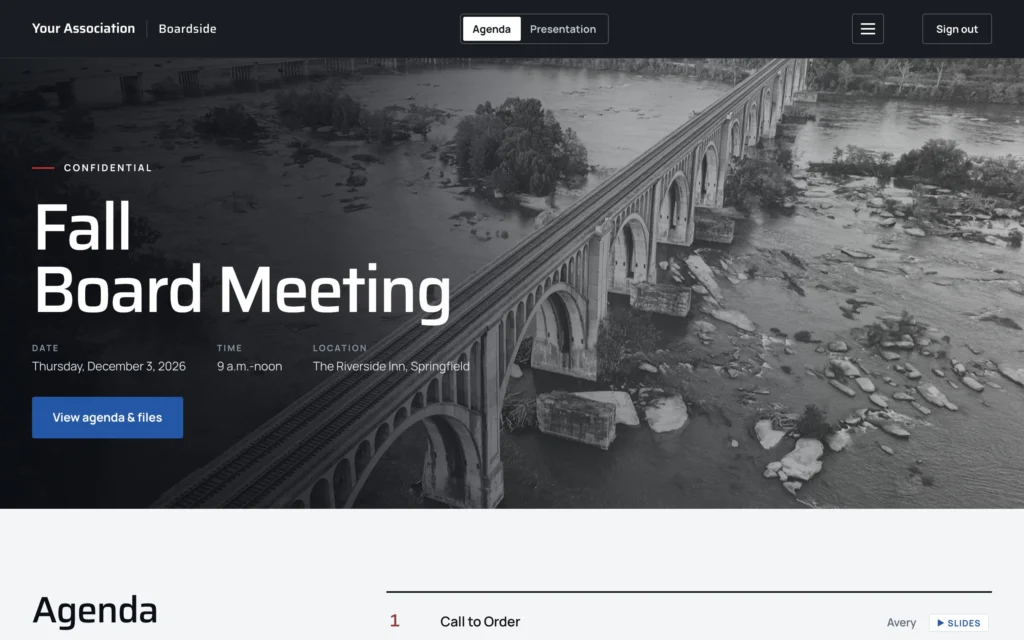
What’s inside
What the board needs, before, during and after.
-
One code, no accounts
Board members sign in with a single code for the meeting. No usernames, passwords or app to install.
-
Locked until opened
Everything in Boardside stays encrypted in the page until the right code is entered, and the page is kept out of search engines.
-
Agenda first
Each agenda item carries its own files, presenter and time, so nobody hunts through a folder.
-
Read it anywhere
Reports open in a built-in reader, page by page, with printing and the original PDF a tap away.
-
What changed, at a glance
New, updated, draft and proposed files are flagged, so a revised report never gets missed.
-
The numbers up front
Budget and campaign figures show as simple progress bars before anyone opens a spreadsheet.
-
Who’s who
Officers, directors, committees and staff, with their roles.
-
Events and video
What’s coming up, like the next convention, and your organization’s video, right inside Boardside.
-
Your look, your website
Built in your organization’s colors and run inside the website you already have. No new platform to learn.
One meeting, start to finish.
Run it yourself or hand it to us. Your staff can put a meeting together from the dashboard in an afternoon, or send us the files and we’ll handle every meeting for you. Either way, it’s the same four steps.
-
Weeks out
Gather the packet
The agenda, minutes and reports go in as they’re ready, each beside its agenda item and easy to read on any device.
-
Before the meeting
Publish it
In your organization’s look, with a new access code for this meeting. One link, one code, and the board is in.
-
Up to the day
Keep it current
A report changes? Swap it in. It’s flagged as updated, so nobody reads an old version.
-
After
Close it out
The code changes for the next meeting and the old one stops working. Governing documents carry forward.
What boards ask about Boardside.
Is it secure?
Each meeting has its own access code. Until it’s entered, everything on the meeting page is encrypted, and the page is kept out of search engines. The code changes every meeting.
Do board members need an app or an account?
No app or individual account is required. Board members can open the meeting page in a web browser on their phone, tablet or computer and enter the access code to view the meeting materials.
Does it work with our website?
Yes. On a WordPress site, Boardside installs as a licensed plugin and runs inside the website you already have, in your look, with nothing new for your board to learn. Not on WordPress? We can set up Boardside as its own site for you, at an address like board.yourorganization.org, as an added service.
Who keeps it up to date?
Your call. Your staff can run each meeting themselves, or we’ll handle the setup, publishing and updates for you.
How is Boardside different from a board portal?
Most board portals ask every member to create an account and learn an app. Boardside is board meeting software built around one meeting at a time: members open a single private page with a code, read the agenda and reports there, and follow along live. There are no accounts to manage and nothing to install.